
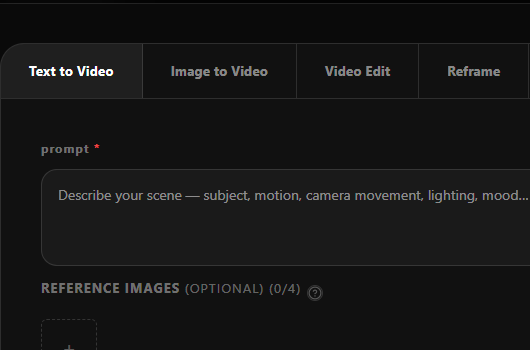
01
Choose Your Workflow
Select text-to-video, image-to-video, video edit, or reframe. Ray 3.2 handles all four — pick the one that fits your starting point.
Powered by Ray 3.2 · Frame-Level AI Video
Direct any frame. Finish every cut.
Upload a source video, then guide changes with prompts, keyframes, and Reframe. Ray 3.2 helps you turn existing footage into campaign-ready variants while preserving motion, structure, and timing.
Available through leading creative platforms
Choose a workflow, enter your prompt, and create cinematic video directly in your browser.
Oput Preview

Ray 3.2 is Luma AI's latest video generation model, turning text descriptions and images into fluid, cinematic clips.
Unlike older AI video tools, Ray 3.2 handles complex motion, lighting changes, and multi-subject scenes with notably more consistency. Describe a scene, upload a reference image, reframe footage, or edit video content — all from your browser.
It's built for creators, marketers, and storytellers who want professional video without expensive production — a fast, reliable starting point for demos, concept visualization, or content at scale.
01
Place up to 16 keyframes inside a single Ray 3.2 clip. Direct exactly where the look shifts, where a performance lands, and how each beat resolves — frame by frame, not clip by clip.
02
Ray 3.2 generates real 16-bit HDR color — not a filter added afterward. Export as EXR in ACES2065-1 (AP0) color space, ready to drop straight into Nuke, DaVinci Resolve, or any VFX pipeline.
03
Generate from text, animate a still image, restyle existing footage with Ray 3.2 Modify Video V2, or reframe any clip to a new aspect ratio. One model covers the full production chain.
Ray 3.2 is built around source video. Upload existing footage, guide the change with prompts or keyframes, and create a new version while preserving motion, structure, timing, and performance.
Write a detailed scene description and Ray 3.2 generates a cinematic video clip with accurate motion, camera behavior, and lighting. Works for trailers, ads, social content, and creative prototyping. No source footage required.
Upload a reference image and describe the motion, camera path, and emotional tone you want. Ray 3.2 animates the image into a cinematic clip while preserving the visual identity of your source. Ideal for concept art, character shots, and illustrated scenes.
Upload a clip, describe the visual change you want, and Ray 3.2 transforms it while preserving the original motion, timing, and scene structure. Swap environments, change outfits, restyle lighting — the actor's performance stays intact. Supports up to 20 seconds at 1080p.
Change the aspect ratio of any clip without cropping. Ray 3.2 Reframe fills newly exposed canvas areas with scene-consistent, prompt-guided content that matches the original mood, lighting, and environment. Turn a 16:9 cinematic shot into a 9:16 vertical in minutes.
Beyond the four core workflows, Ray 3.2 handles the most demanding visual production tasks.
Set up to 16 keyframes across a single clip. Direct the exact moments where motion shifts, lighting changes, or the story resolves.
Transfer full facial expressions across shots. Tracks up to 8 faces simultaneously with skeletal pose and posture accuracy.
Extract motion from any source clip and apply it to new characters, objects, or scenes — preserving choreography and camera dynamics.
Transform people into entirely new characters — different appearance, costume, species — while the performance carries through unchanged.
Swap the setting of any scene — location, season, lighting, world — without rebuilding the shot from scratch.
Change the time of day, mood, or light source across an entire clip while keeping motion and subject intact.
Modify the product in an existing scene for different SKUs, seasonal variants, or market-specific campaigns — no reshoot needed.
Create market-specific video variants from one master clip — different settings, talent, or cultural context — at scale.
Ray 3.2 outputs drop cleanly into the timelines and compositing tools your team already uses.
Real 1080p — no upscaling. Available across all four Ray 3.2 workflows.
16-bit color generated by the model — not post-processed. Vivid, accurate, gradeable from the first render.
The model generates real 16-bit color — it's not post-processed. You get accurate color straight out of the render, ready for grading.
Modify Video supports up to 20s at 24fps. T2V and I2V generate 5s or 10s native clips.
Up to 16 keyframes per clip for both Modify Video and Image-to-Video workflows.
Ray 3.2 is available via the Luma API. Integrate any workflow directly into your tools, pipelines, and production software.
Four steps from prompt to production-ready video. No downloads, no GPU required.
01
Select text-to-video, image-to-video, video edit, or reframe. Ray 3.2 handles all four — pick the one that fits your starting point.
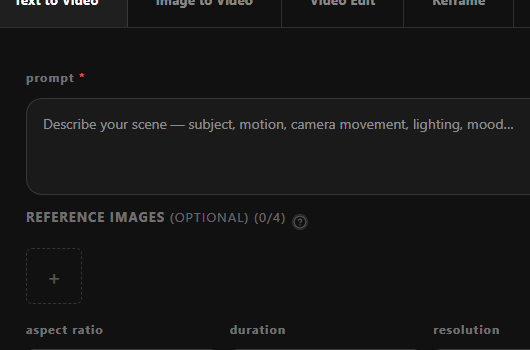
02
For T2V: describe the subject, motion, camera, lighting, and mood in detail. For other workflows, upload your source image or clip alongside the prompt.
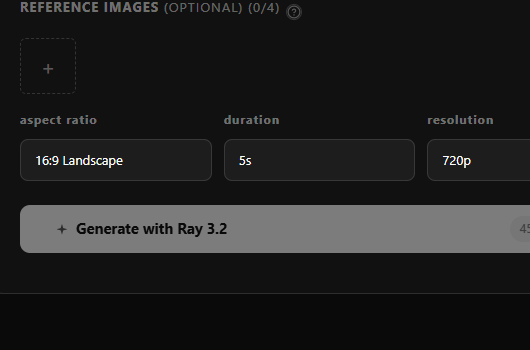
03
Choose 540p, 720p, or 1080p. Select 5s or 10s for generated clips. Start at lower resolution to validate your prompt, then step up for final delivery.
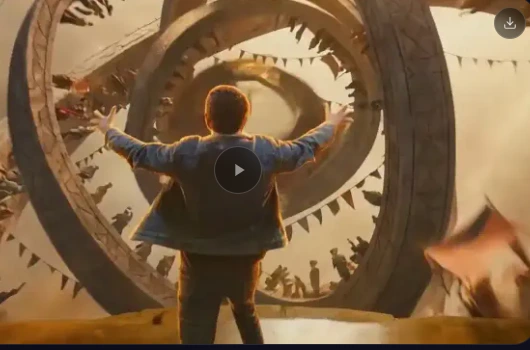
04
Submit and download your finished Ray 3.2 video as MP4, HDR, or 16-bit EXR. Ready for your timeline, comp, or social publish.
Ray 3.2 works across industries where video quality and directorial control actually matter.
Use Ray 3.2 text-to-video to prototype story beats, test camera angles, and build shot references before production begins. Generate cinematic sequences at 1080p HDR in minutes.
Ray 3.2's video editing and campaign localization help you build product videos, commercial concepts, and market-specific variants — without reshooting every SKU or market.
Animate concept art and character illustrations with Ray 3.2 image-to-video. Prototype cinematic cutscenes, creature animations, and environmental effects for pitching and pre-production.
Generate short-form vertical clips, reframe existing footage with Ray 3.2 Video Reframing, and produce platform-native content for TikTok, Reels, and Shorts at speed.
Export your Ray 3.2 HDR renders as 16-bit EXR frames in ACES2065-1 color space. Drop them straight into Nuke or DaVinci Resolve — no extra conversion steps.
Integrate Ray 3.2 through the Luma API. Automate your video generation workflows at scale — built for agencies serving entertainment, fashion, and e-commerce clients.
Whether you're creating from scratch or transforming existing footage, there's a Ray model built for your workflow.
| Dimension | Ray 3 | Ray 3.14 | Ray 3.2 |
|---|---|---|---|
| Core positioning | Next-generation reasoning-driven AI video model | A faster, more cost-efficient version of Ray 3 | A controllable video transformation model built for production V2V workflows |
| Primary tasks | T2V, I2V, V2V, Keyframe, Extend, Upscale | Faster, cheaper, more stable generation plus Modify Video | Transform existing footage — remix, replace, and reimagine your shots |
| Core input | Prompt, image, video, keyframes, and more | Prompt or video, with start-end style Modify support | Source video required, plus a prompt or keyframes (at least one) |
| Text-to-Video | Yes | Yes | No — built for video transformation, not text-to-video |
| Image-to-Video | Yes | Yes | No — works with video input, not still images |
| Video-to-Video | Yes | Yes, with Modify Video | Yes — core capability, production-grade V2V |
| Keyframe control | Keyframe support across generation modes | Start and end frame workflow | Multi-keyframe — anchor specific frames on your source video's timeline |
| Control precision | Reasoning, annotation, and prompt adherence | Faster and more stable than Ray 3, with stronger prompt adherence | Frame-level control, adherence, characters, motion and structure handling |
| Video duration | Varies by generation mode | Supports fixed-duration clips, loops, and more | Matches your source video length — up to 20 seconds |
| Max resolution | Native 1080p generation, HDR and 4K HDR mastering support | Native 1080p generation, 4× faster and 3× lower cost | 1080p output across every mode |
| HDR | Native 16-bit HDR | Supported | HDR video-to-video supported |
| EXR output | 16-bit EXR frames | Supported | 16-bit EXR export for color grading, compositing, and VFX |
| API | Available through Ray model endpoints | Not highlighted as a core differentiator | First release with a complete control surface API — built for developers |
| Best for | Creators, filmmakers, advertising teams, and game studios | Teams that need faster iteration and lower cost per generation | Studios, agencies, enterprise marketing teams, developers, and post-production teams |
| Typical use cases | Creative generation, story shots, visual exploration, T2V / I2V / V2V | Fast generation, Modify Video, loops, and duration adjustments | Product swaps, background replacement, character transformation, ad localization, multi-aspect-ratio delivery, and VFX look development |
| Key strengths | Reasoning, visual quality, physical consistency, HDR, and Draft Mode | Faster, cheaper, and more stable | Controllable, consistent, production-pipeline-ready, and reduces reshoots |
| Our recommendation | Best for creating video from scratch or multi-modal video generation | Best for fast exploration, low-cost iteration, loops, or duration changes | Best when you have existing footage to remix — ad variants, professional post-production, and API-driven workflows |
Transparent Pricing
Credits power Ray 3.2 AI Video Generator in your browser — up to 1080p HDR video with EXR export. One-time packs with no subscription; credits never expire and are only deducted on successful generation.
$9.9
160 credits
Try Ray 3.2 with a lightweight credit pack — perfect for testing Text-to-Video and Image-to-Video before scaling up.
$29.9
580 credits
For creators generating regularly — better per-credit value for daily Ray 3.2 workflows across all four modes.
$49.9
1,100 credits
Best balance for marketing teams and content pipelines — more credits at a lower per-credit cost for frequent Ray 3.2 production.
$99.9
3,330 credits
Lowest per-credit cost for high-volume production — campaigns, client deliverables, and daily Ray 3.2 output at scale.
Prices include all taxes. One-time packs — credits never expire.
Everything you need to know before you generate your first clip.